
UnitedHealthcare
UNITED HEALTHCARE SERVICES, INC.Medical
4.625.80K Reviews
- Version
- 3.16.0
- Installs
- 5.00M
- Age Rating
- Everyone
Screenshots
Our Review of UnitedHealthcare
 Analysis by Appyee
I treat any health-insurance app as a place to check information, not as a substitute for reading the plan itself or speaking with a care professional. That distinction matters with UnitedHealthcare: its appeal is having plan-related tasks together on a phone, while the usefulness of what I see still depends on my coverage and the details of a particular visit. I’d use it to prepare and keep track, then confirm important costs or coverage decisions before acting on them.
A health app tied to a particular insurer
This is a free medical app from UNITED HEALTHCARE SERVICES, INC., and that insurer-specific focus is both its main strength and its clearest limit. If UnitedHealthcare is your health plan, a single place to look for care, review benefits, and follow claims can save time compared with moving between paper documents, provider offices, and customer-service calls. If you are insured elsewhere, it is not a general health-record organizer that replaces your insurer’s own tools.
The app has a 4.6 average from around 187,000 ratings and has been installed over 5 million times. It is rated for Everyone, so the audience label is broad, but the practical question is whether you have a UnitedHealthcare plan and whether the app’s available information fits your needs. It was released in 2018 and its current version is 2.96.0; the minimum operating-system requirement is version 8.0. Those details are useful when deciding whether it is suitable for an older phone, though they do not tell me how smoothly it will run on every device.
Trust starts with checking, not assuming
Health and insurance details are personal, so I would not treat reassuring language about security as proof of a specific privacy practice. The app’s purpose involves plan information and care searches, but I would review the permissions it requests on my own device and grant only what makes sense for the task. I would also check the account and privacy controls available after signing in, rather than assume that every setting works the same way for every plan or phone.
That careful approach is not a reason to avoid the app; it is a sensible habit for any tool that brings health-related tasks onto a phone. I would use a strong, unique password for the account, keep the phone’s own screen lock enabled, and avoid opening sensitive information on a shared device. If I were helping a family member, I would let them sign in themselves rather than pass around credentials. These are practical safeguards I control, not claims about features the app may or may not provide.
Use estimates as a starting point
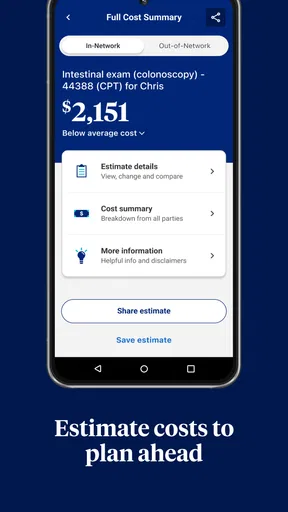
The cost estimator is potentially useful when I am comparing care options, but I would treat an estimate as a planning aid rather than a guaranteed bill. A final amount can depend on the service, provider, plan details, and how a claim is processed. Before scheduling something expensive, I would check the estimate against my benefits and confirm details with the provider or insurer. That extra step is less convenient than trusting one screen, but it is the more careful way to avoid surprises.
For a routine appointment, I can imagine opening the app before calling a doctor: first checking whether the doctor appears in my network, then reviewing plan information and any available cost estimate, and finally keeping an eye on the claim afterward. That sequence makes the app more useful than simply searching for a name at the last minute. It also helps me spot questions to ask before care, when there is still time to compare options.
Who benefits, and who may prefer another route
I would recommend trying it if you are a UnitedHealthcare member who wants to look up care and keep an eye on plan details without relying entirely on paperwork. It may be especially handy when an appointment is coming up, a claim needs checking, or you are trying to understand benefits before choosing a provider. Someone who rarely uses their plan may still appreciate having that information accessible, but should not expect an app to remove the need to understand the policy.
If you are not covered by UnitedHealthcare, or you mainly want a broad personal health record that follows you across insurers, this is probably not the right primary tool. Your insurer’s own app is usually the more relevant comparison for coverage questions; a provider’s site or phone line may be better for appointment-specific details. And when a decision is urgent or the app’s information seems unclear, contacting the insurer or care provider directly is more appropriate than relying on an uncertain screen.
What I would check before relying on it
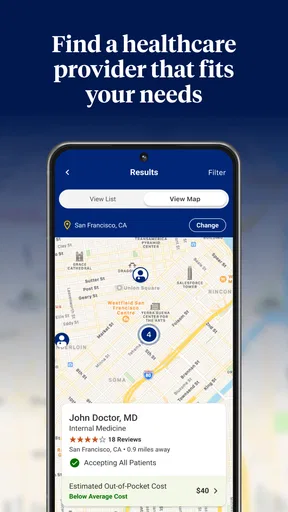
Before using the app for a real decision, I would confirm that I am signed into the correct account, check that the plan details shown match my current coverage, and review the provider information carefully. Search results can help narrow down choices, but I would still verify that a particular clinician is accepting patients and that the intended service is covered. A listing is a useful lead, not a substitute for confirming availability or benefit rules.
I would also make a habit of revisiting claim information after care rather than assuming that an initial estimate or appointment entry settles the final amount. If figures or coverage descriptions do not line up with what I was told, I would save the relevant details and contact UnitedHealthcare or the provider for clarification. This is a low-friction way to use the app while leaving room for the real-world complications that can affect insurance decisions.
Your Personal Health Hub
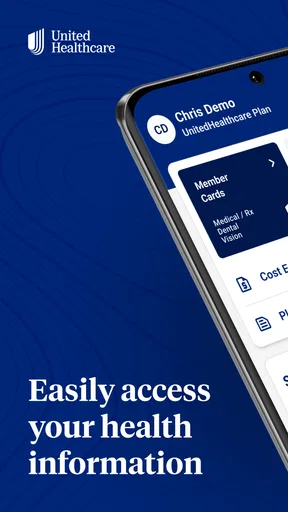
The UnitedHealthcare app is essentially a one-stop shop for all your health-related needs. You can access your insurance information, find doctors, and even track your claims. It’s like having your entire health plan right in your pocket! I mean, who wouldn't want that kind of convenience?
Finding Care Made Easy
One of the standout features for me is the ability to quickly find doctors and specialists within your network. The app provides detailed profiles, so you can make informed decisions about your care. Plus, you can read reviews from other patients, which is super helpful if you’re trying to find the right fit.
Manage Your Plan
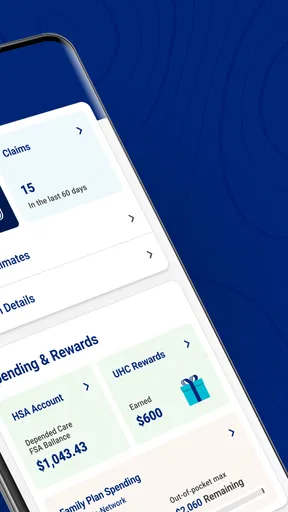
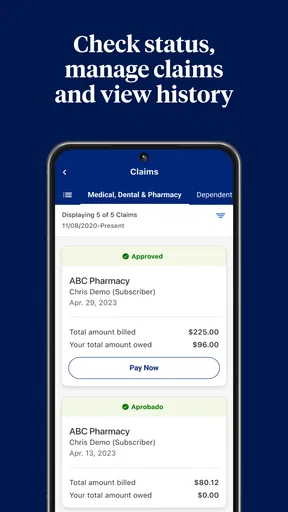
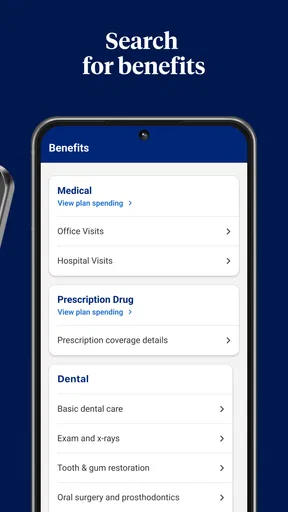
Managing your health plan has never been simpler. You can view your benefits, check your deductible status, and keep track of your claims. No more sifting through piles of paperwork or endless phone calls. Just a few taps, and you’ve got all the info you need.
Cost Estimator and More
Budgeting for healthcare can be tricky, but the app’s cost estimator tool is a game changer. You can get estimates for common procedures and visits, so you're not blindsided by unexpected costs. And if you’re anything like me, having that peace of mind is invaluable.
Secure and User-Friendly
Security is always a concern, especially with sensitive health information. Thankfully, the app has robust security measures in place. Plus, the user interface is intuitive and easy to navigate, making it accessible even for those who might not be tech-savvy.
So, if you're looking to simplify your healthcare management, the UnitedHealthcare app might just be what you need. It’s packed with features that are not only practical but also incredibly user-friendly. Give it a try, and see how it can make your health journey a little less complicated.
Privacy and Permissions
See what permissions an app requests and how it handles your data.
- Calendar
- read calendar events plus confidential information, add or modify calendar events and send email to guests without owners' knowledge
- Location
- approximate location (network-based), precise location (GPS and network-based)
- Photos/Media/Files
- read the contents of your USB storage, modify or delete the contents of your USB storage
- Storage
- read the contents of your USB storage, modify or delete the contents of your USB storage
- Camera
- take pictures and videos
- Microphone
- record audio
- Wi-Fi connection information
- view Wi-Fi connections
- Other
- view network connections, change network connectivity, full network access, change your audio settings, run at startup, draw over other apps, control vibration, prevent device from sleeping, install shortcuts, uninstall shortcuts
Verdict
Strengths of UnitedHealthcare
- User-friendly interface simplifies navigation.
- Comprehensive coverage details in one place.
- Real-time updates on claims and benefits.
- Secure login ensures privacy and safety.
- Helpful health resources and tips included.
Limitations of UnitedHealthcare
- Limited support for non-English speakers.
- Occasional app crashes disrupt usage.
- Requires frequent updates for stability.
- Some features need internet connectivity.
- Limited customization of notifications.
Other Releases by UNITED HEALTHCARE SERVICES, INC.
View All
UMR | Health
Medical4.4

NYC Employees PPO Plan
Medical4.7
Similar Picks in This Category
View All
WebMD: Symptom Checker
WebMD, LLC4.1

Microphone Amplifier
DOSA Apps4.2

Anatomy Learning - 3D Anatomy
3D Medical OU4.5

Period Tracker and Calendar
SimpleInnovation4.9

GoodRx: Prescription Coupons
GoodRx4.8

CVS Health
CVS Pharmacy4.5
Frequently Asked Questions
What features does the UnitedHealthcare app offer?
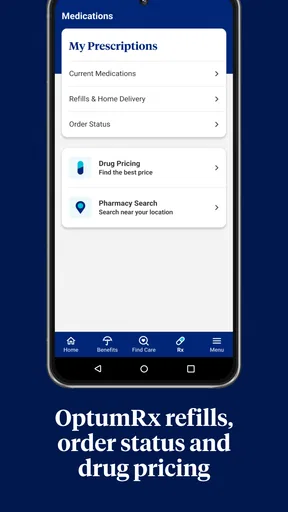
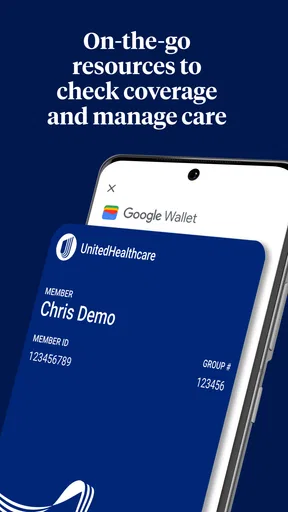
The UnitedHealthcare app provides a range of features designed to simplify healthcare management. Users can access their health plan details, find in-network doctors, view and pay bills, and track their deductible and out-of-pocket expenses. It also includes a virtual ID card and allows users to manage prescriptions and track wellness activities.
Is the UnitedHealthcare app secure for my personal information?
Yes, the UnitedHealthcare app prioritizes user security. It employs advanced encryption and authentication measures to protect personal and medical information. Users can also set up biometric login options, such as fingerprint or facial recognition, to add an extra layer of security to their accounts.
Can I use the UnitedHealthcare app to find a doctor or specialist?
Absolutely. The app includes a robust search feature that allows users to find in-network doctors, specialists, and facilities based on location, specialty, and user reviews. This makes it easy to schedule appointments and ensure that healthcare providers are covered under your plan.
How do I manage my prescriptions using the UnitedHealthcare app?
Managing prescriptions is straightforward with the UnitedHealthcare app. Users can view their current medications, refill prescriptions, and check the status of their orders. The app also provides reminders for medication intake and alerts for prescription renewals, ensuring you stay on top of your medication regimen.
Does the UnitedHealthcare app support wellness and fitness tracking?
Yes, the app supports wellness and fitness tracking by integrating with various health apps and devices. Users can track their steps, activity levels, and other health metrics. It also offers personalized wellness recommendations and challenges, encouraging users to maintain a healthy lifestyle and potentially earn rewards.
